
AutoEstimatePro is available on Android through Google Play as well as on iPhone. The useful first step is preparing one vehicle’s evidence: a matching VIN, a clear photo set, and a short list of unknowns. A preliminary estimate can then organize a repair conversation instead of becoming a number you treat as a final quote.
This guide covers Android photo and VIN intake, the report’s detailed findings and cost lines, AI Part Finder, vehicle values, bid and transport planning, and sharing a useful repair handoff. The app download is free; reports and account features can require payment. Check current access, included features and purchase terms in your app.
Get AutoEstimatePro for Android on Google Play
Keep the vehicle identity beside the photos
Create a separate folder or album for each car before selecting images. Use a short name you can recognize, such as the year, make, model, and final six VIN characters. If the photos came from an auction listing, keep the lot number, listing link, and capture date in the same research note. A saved screenshot can outlive the listing that explained it.
Check the full VIN against the vehicle or the source listing before entering it. Do not combine photos from two cars because their model and paint color look similar. If the VIN on a dashboard photo disagrees with the listing, resolve that mismatch before relying on an estimate. A wrong vehicle identity can make an otherwise clear photo set misleading.
A VIN decoder identifies encoded vehicle information. It does not establish a complete accident history, confirm the seller’s title, or prove that a photographed part is original. Keep identity checks, linked historical records, and present-condition inspection as separate tasks. NHTSA provides an official VIN decoder for reviewing manufacturer-reported identifying information.
Review NHTSA’s VIN decoder explanation
Build a photo set that explains the damaged area
Start with context, then move closer. A wide corner view tells the reviewer where a damaged lamp sits. A straight-on view shows its relationship to the hood and fender. A close-up helps show the crack or mounting area. Those three views answer different questions; three nearly identical close-ups do not replace them.
- Include a wide view of the whole vehicle and the affected side or corner.
- Add straight-on and angled views of the damaged area from a safe standing position.
- Include clear close-ups without cropping away the component’s surroundings.
- Keep available photos of the cabin or dashboard with their context; a photographed warning light is a reason to investigate, not a diagnosis.
- List areas that are missing, obscured, or unsafe to photograph. Do not crawl under or disassemble a damaged vehicle to complete a photo checklist.
Use original-resolution files when available. Keep a separate untouched copy before making upload copies. Avoid beauty filters, artificial blur, and edits that hide scratches or panel edges. If a file is rejected, check the upload requirements and export a compatible copy; simply changing a filename extension does not convert the image.
On Android, the appearance of the photo picker depends on the device and software version. Select the intended vehicle’s files, review the chosen set, and remove unrelated images before submitting. If photos are stored in the cloud, make sure the selected copies are available and open correctly. Grant only the access needed for the workflow shown on your device.
Submit one vehicle and record what remains unknown
Enter the vehicle details and select the photos through the app’s estimate workflow. Before confirming a paid report, review the purchase screen and selected vehicle. Check that the report type fits your purpose: repair planning and an auction buying decision may require different assumptions. Do not assume every report includes every feature pictured in a marketing example.
Write an inspection note while the details are fresh. For example: “Front bumper cover visibly cracked; radiator and inner reinforcement not visible; headlamp mounting condition unknown.” This short note separates what the photos show from what you need a technician to verify. It also gives you a useful check when reading the report.
Read the line items before the total
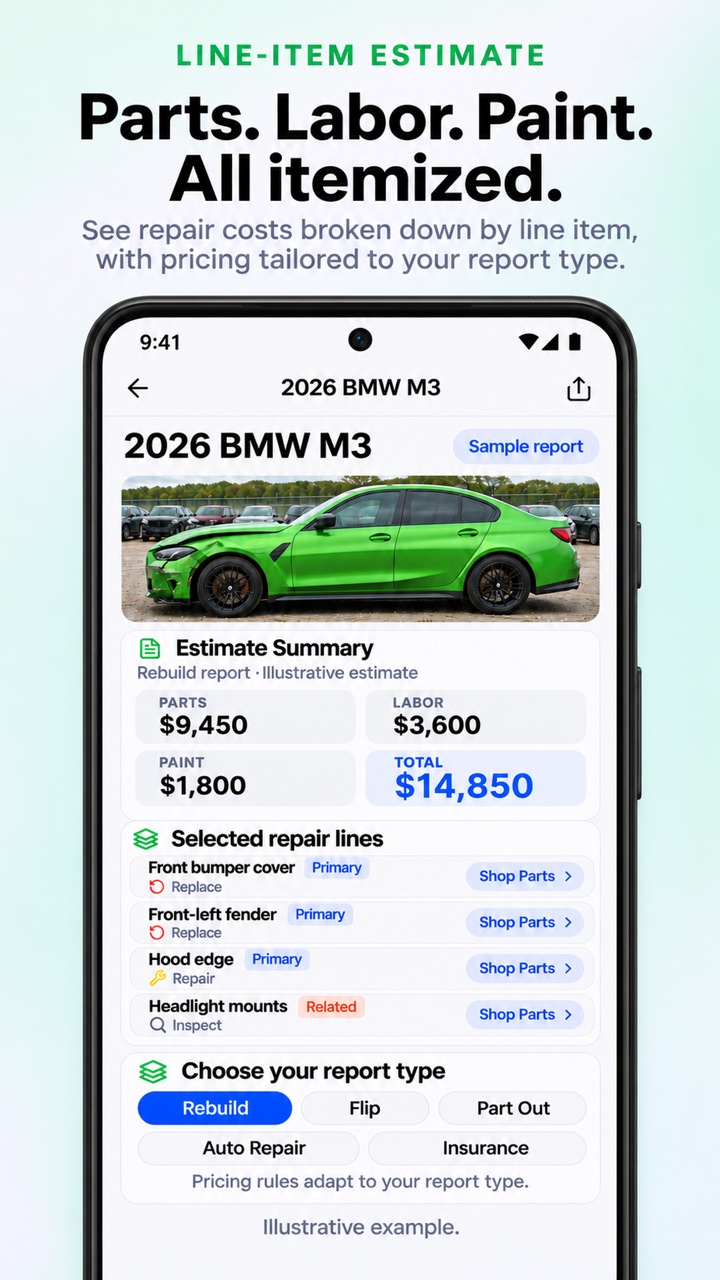
Start with the component name and suggested action. Repair, replace, and inspect mean different next steps. Then look at estimated parts cost, labor hours, labor rate, paint work, and materials. Ask whether a quoted part includes necessary brackets or hardware and whether a labor operation overlaps another line. A more detailed total can still omit work that was not visible.
Primary, related, and inferred findings should not be read as equally confirmed damage. Related or inferred items identify possibilities for inspection. An unpriced or zero-dollar inspection item is unresolved cost, not proof that the work is free. Similarly, an AI confidence indicator is not a guarantee that every damaged component has been found.
Use the report as a scope checklist. Before authorizing work, ask a qualified professional to assess structural areas, safety systems, mechanical condition, and any required diagnostics or calibration. Suggested repair guidance is not a substitute for the vehicle-specific procedures and measurements that professional work requires.
Choose the report purpose and understand its sections
The app offers Repair, Insurance, Rebuild, Flip/Resell, and Part Out. Repair organizes a shop-oriented repair assessment. Insurance supports a damage and repair conversation and can show supplied shop, customer, insurer or claim-reference information; it does not decide coverage. Rebuild starts from economy or aftermarket-oriented assumptions. Flip uses quality aftermarket or OEM-equivalent starting assumptions, while Part Out addresses teardown and dismantling planning.
Rebuild, Flip and Part Out include auction-oriented vehicle-value and investment sections where supported. Repair and Insurance hide those investment sections. Available parts purchase links appear in Rebuild, Repair and Insurance reports; Flip and Part Out deliberately omit them. Those differences matter when choosing a report for a specific decision.
Open the vehicle details and submitted photo set alongside the damage findings. The report can include component names, severity, actions, evidence labels, analysis date, hidden-damage risk, and detailed vehicle specifications. Cost lines separate parts, operation and labor codes or hours, body labor, paint/refinish labor, materials and the total. An editable hourly rate lets you compare the same planning scope using different labor assumptions.
Expand a component for available reasoning, repair guidance and related repair-video links. Use that detail to compare scope: access work, refinish work, diagnostics or calibration can explain a difference between two estimates. The guidance is not a verified manufacturer procedure. A qualified professional confirms the appropriate operations and final price for the vehicle.
Use report sourcing and AI Part Finder for different questions
Report sourcing follows a component in the damage assessment through to available replacement listings. The separate Parts-tab tool starts from photographs of a part you want to identify. Use the first when following an estimate line; use AI Part Finder when your question is “What is this part, and which replacements should I investigate?” Sign-in and eligible paid-account access are required; check your current access in the app.
- Add one to three clear part photos. Show the whole component, another useful angle, and readable markings or connectors.
- Supply the vehicle context you know. Add an optional ZIP code when local salvage pricing would help. Similar appearance alone does not establish compatibility.
- Review the proposed identification: name, category, side, a possible OEM number, compatibility, visible condition notes and buying tips when returned.
- Compare replacement sources, then verify the exact part number, fitment, condition, stock, shipping, returns and final price with the seller.
For example, a Rebuild report might identify a damaged headlamp and link a replacement lamp. An inspection may reveal a separate broken bracket that you cannot confidently name. Photograph the bracket and its markings, add the vehicle information to Part Finder, then use the proposed identification to ask a supplier a specific fitment question. A lower lamp price is not a lower completed-repair price if brackets, shipping or the correct lighting equipment are missing.
Explore the AI Part Finder workflow
Read auction values and the three bid strategies together
Auction reports can show as-is planning values, clean- and salvage-title after-repair estimates, part-out ranges, and market examples or source information. Where returned, market demand, repair complexity, parts availability and resale outlook add context. Some fields may be unavailable or use fallback estimates, so compare the report with current evidence for your intended exit.
The report’s investment section compares Maximum Flip Bid for as-is resale, Maximum Rebuild Bid for repair and resale, and Maximum Salvage Bid for part-out. Select a target return to see how the planning ceiling changes. Verify the current fee assumptions and use actual account-specific charges before bidding. Actual buyer charges can differ by auction, account, lot and bid, so verify them before using a result.
The separate Max Bid calculator in Tools offers a different input-driven workflow. Enter expected resale value, repair cost, transportation, miscellaneous expenses and target profit, then use estimated fees or provide your own amount. It works backward from those assumptions. Replacing an estimate with a verified cost is more useful than treating a displayed ceiling as an instruction to bid.
Include transport and a practical inspection handoff
The report’s transport calculator accepts origin and destination cities or ZIP codes, or a distance you provide. It applies a vehicle-size adjustment and shows an estimated breakdown you can add to the report. Compare that planning amount with a carrier’s actual terms, including operability, loading, route and timing requirements. The tool does not book transport or provide a carrier’s binding quote.
Use saved reports to return to the same vehicle, then share the report’s web link through your phone with your repair professional or buying partner. Explain what is known, what still needs inspection, and which assumptions you changed. A shared reference helps prevent one person discussing a parts-only subtotal while another assumes paint, labor and transportation are included.
Ask the AI Auction Assistant focused buying questions
The Tools tab includes a signed-in text assistant for auction, repair and budget questions. Ask about buying criteria, salvage-title research, risks, seller questions, or listing details you paste into chat. For example: “I am comparing these two rebuild candidates with this budget and these title descriptions. Which missing facts would change the decision?”
The current Car Repair Estimate & Parts app provides personalized assistants for auction buying, rebuilding, body-shop work, claims and everyday repairs. Attach a saved report, ask follow-up questions, explore 12 suggested questions for your account type and access optional max-bid or all-in cost calculations. Assistant conversations do not use report credits. Answers remain preliminary: confirm the supporting record, actual repair scope and transaction terms before acting.
Turn uncertainty into a decision, not an assumed saving
Consider an illustrative report with $1,200 in parts, 10 labor hours at a user-selected $80 rate, and $500 for paint and materials. The planning subtotal is $2,500. If a headlamp mount remains uninspected, the subtotal does not establish that the mount is sound or included. Record “mount inspection and possible replacement pending” beside the total.
Now suppose a shop’s $3,200 quote includes an additional component and a documented calibration that the photo-based report did not price. The difference is $700, but that alone does not show overcharging. Compare the included operations, part condition, labor rate, diagnostics, and warranty before judging the two numbers. Replace assumptions with the shop’s verified scope and written prices.
For an auction purchase, keep the repair allowance separate from buyer fees, taxes, transport, storage, and title-related work. Use current amounts for your account and destination. If one of those amounts is unknown, mark the total incomplete rather than quietly entering zero. The report supports your planning; it does not guarantee a profitable bid or roadworthy vehicle.
Share a useful handoff with your repair shop
- Vehicle: full VIN and year, make, and model as verified.
- Evidence: original photos, their source, and the date captured.
- Report: the preliminary estimate, with the report date or identifier.
- Confirmed facts: what is visibly damaged or already inspected.
- Open questions: unpriced lines, hidden areas, part fitment, diagnostics, and calibration.
- Decision needed: inspection scope, written repair quote, or whether to continue researching the purchase.
Reopen the saved report and use its share option to send a web report link through your phone. Review the report before sharing, keep unrelated personal documents out of the photo set, and retain the later shop estimate beside the preliminary report so you can track which assumptions changed.
Keep downloads, purchases, and subscriptions distinct
Installing the app does not make every report free. Read the current in-app purchase screen before buying a report or starting a subscription, including any included-report allowance and renewal terms. Do not assume an offer shown in an iPhone illustration applies to Android or that purchases automatically transfer between store accounts.
For subscriptions purchased through Google Play, use the Google account that made the purchase to review or cancel the subscription. Uninstalling the app does not cancel that subscription. Keep the receipt and use the official support options if a purchase or report needs attention.
Google Play: manage or cancel a subscription
Before you request your first Android report
- The VIN and every selected photo belong to the same vehicle.
- The set includes context views and detail views without misleading edits.
- Missing evidence is written down as an inspection question.
- The current purchase terms and report type match the task.
- You will verify the repair scope before bidding or authorizing repairs.
A good first report helps you ask a more precise next question. That may be whether a mounting point needs inspection, which replacement part fits, or why a shop’s written scope differs. Use the Android app to organize that conversation while keeping the professional inspection and final repair decision grounded in the actual vehicle.