
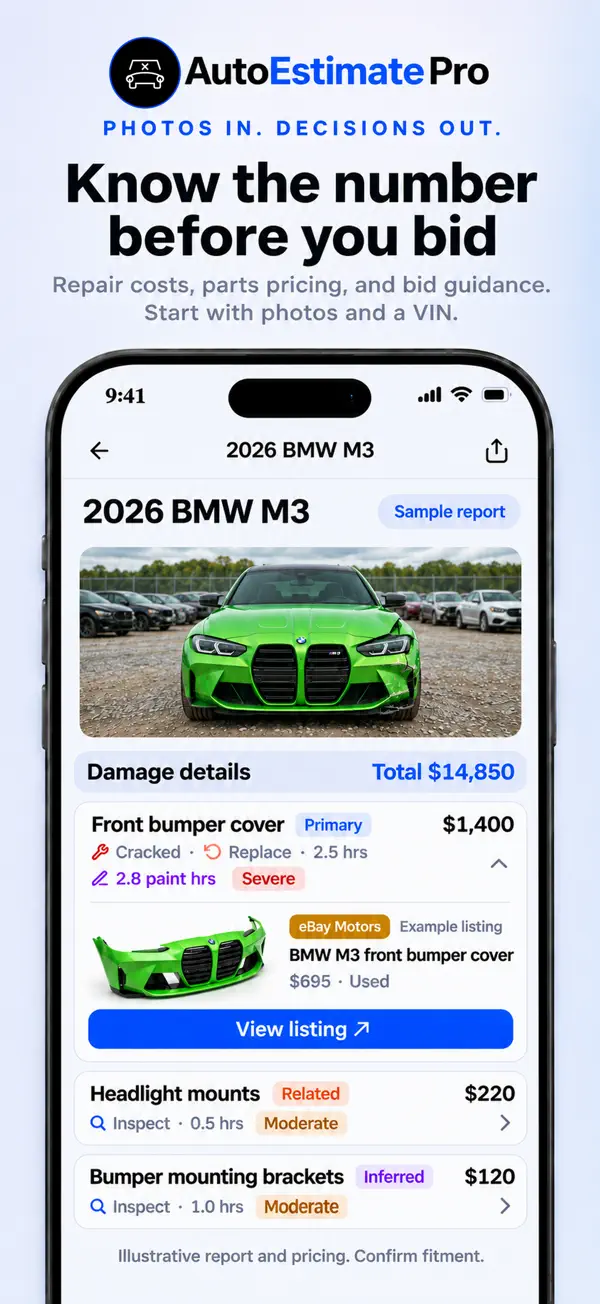
Car Repair Estimate & Parts is the Android and iPhone app from AutoEstimatePro LLC for turning vehicle photos and a VIN into a preliminary repair plan. The useful result is more than a headline amount. You want a record of the vehicle, the evidence supplied, the components flagged, the costs that have been estimated, and the questions that remain open. This guide follows that record from the first photo to a conversation with a repairer, supplier or buying partner.
The current store listings describe photo-based repair estimates, available replacement-part sources, exact-VIN public auction records when found, model-year recall information, personalized assistants and bid-planning tools. Those functions answer different questions. A decoded vehicle specification is not an accident record. A possible part match is not confirmed fitment. A generated repair allowance is not a shop's commitment to perform the work. Keeping those distinctions visible makes the app more useful because you can see what evidence to obtain next.
This guide is written by the app's publisher, AutoEstimatePro LLC. The screenshots show current store artwork, not an independently inspected customer vehicle. All monetary examples below are invented to demonstrate a workflow; they are not current market prices or estimates for your car. The product reference was checked against the U.S. store listings on November 13, 2026. Store availability, purchase terms and interfaces can change, so use the version and checkout information on your own device.
1. Choose the decision before you choose the photos
Begin with one sentence describing the decision you need to make. A driver might write, "I need to understand the scope of this parking-impact repair before I call two shops." An auction buyer might write, "I need to decide whether to pay for an inspection before considering this lot." A technician gathering intake information might write, "I need a structured first draft that separates the customer's photos from findings we will verify here." Each sentence implies a different next step even when the photos look similar.
Then write down who will use the result. If a repair shop is the next reader, emphasize the affected area, symptoms you actually observed, and access to the vehicle. If a parts supplier is the next reader, emphasize the VIN, the component, equipment details and readable markings. If a buying partner is the next reader, emphasize the purchase scenario, missing records and costs that remain unconfirmed. A report can support all three conversations, but a concise cover note prevents people from treating it as something it was never intended to be.
Avoid starting with a target answer such as "prove this repair is cheap." That encourages you to select only reassuring photos or overlook inconvenient findings. A more useful question is, "Which unresolved item could change the decision?" The answer might be a mounting point that cannot be seen, a missing title document, or a component whose availability is unknown. Documenting that uncertainty early can save repeated submissions and unnecessary shopping later.
Keep one project note for each vehicle. Give it a short, recognizable name and record the VIN, source link if applicable, date, intended use and next decision. This note can live in your normal notes app; it does not require a new service. The important feature is that you can find the evidence and explain why the report was requested when you revisit it a week later.
2. Confirm the app, device and account you are using
Both current store listings use the name Car Repair Estimate & Parts and identify AutoEstimatePro LLC as the developer. The iPhone listing uses the subtitle AI Damage & Auction Bid Tools. The Android listing describes photo repair estimates, VIN auction history, parts and AI bid-planning tools. These names help distinguish the app from similarly named products. Use the official store links on this page rather than an advertisement or a download sent by an unknown third party.
At the November 13, 2026 check, both listings showed version 1.0.4. Apple listed iOS 15.1 or later, and Google Play listed Android 7.0 or later. That is a dated product reference, not a promise that every device or regional account can install the app. Let the store evaluate your device. If the listing shows a newer version, use its current compatibility information. Do not install an unofficial package to bypass a store restriction.
Before requesting a paid report, confirm that you recognize the app account and the store account used for purchases. They can be different identities. A successful store payment does not by itself explain which app account is currently signed in, and changing phones does not establish that two separate store accounts share the same purchase. Record the account you intend to use without putting passwords or authentication codes in your vehicle note.
A short preflight is enough: open the official listing, confirm the developer, open the installed app, check the signed-in account, and read the purchase screen before approving a charge. If any step is unclear, resolve it before submitting the same report repeatedly. This is particularly useful when a family member or colleague is helping: agree who owns the report and who is making the purchase so the evidence, receipt and follow-up remain together.
Current iPhone App Store listing
Current Android Google Play listing
3. Build a vehicle evidence folder that another person can follow
A useful folder tells a story without forcing the next reader to guess. Start with the original photos or listing screenshots, then add a brief note identifying where they came from and when you obtained them. For an auction listing, retain the exact source URL and lot identifier alongside the VIN. A screenshot of a damaged corner can lose its context when it is forwarded, cropped or saved with an automatic filename. The note reconnects the image to the vehicle and the event.
Keep originals separate from upload copies. If you need to reduce a file's size or remove unrelated personal material from a copy, preserve the untouched original. Do not remove a dent, warning indicator, reflection that reveals a relevant surface, or another detail simply because it makes the car look worse. Image preparation should make evidence easier to transfer, not change what the evidence says. Label a cropped detail as a detail and include the wider view when it is useful.
Give each view a functional role: vehicle overview, affected area, close detail, identification or supplied document. The folder does not need an elaborate naming system. Names such as "front-left-wide" and "left-lamp-close" are easier to discuss than a sequence of almost identical camera numbers. Use vehicle-left and vehicle-right consistently, and explain the orientation if there is any ambiguity. A person's left while facing the car is different from the vehicle's left side.
Also keep an explicit missing-evidence list. Perhaps the opposite corner is not photographed, the dashboard image has no date, or a seller has supplied a document with an unreadable section. Write what is missing rather than guessing why it is missing. When you request another photo or record, state which question it should answer. A targeted request is more useful than asking for "better pictures" and receiving another crop of the same visible damage.
If more than one person contributes images, use a simple intake note for each contribution: who supplied it, when you received it, which vehicle it belongs to and whether it is an original photo or a screenshot from another source. A screenshot's file creation time may describe when it was captured on your phone rather than when the vehicle was photographed. Keep those two dates separate when the distinction matters. If you cannot establish the original capture date, label it unknown. That prevents a recent download of an old auction photograph from being mistaken for evidence of the vehicle's current condition. It also gives the recipient a specific question to resolve rather than a misleading impression of certainty.
4. Capture useful photos without turning documentation into inspection
Photographs can help describe visible condition, but they do not justify unsafe access. Work only from a safe, permitted position. Do not enter an unstable vehicle, move damaged components, crawl beneath an unsupported car or touch a damaged high-voltage system to obtain a picture. If the needed view requires workshop equipment or specialist precautions, record it as an inspection requirement. A missing photo is preferable to creating a hazard while trying to improve a report.
For an accessible exterior area, collect context before detail. A wide view shows which part of the car is involved. A second angle can make a panel edge, crease or opening easier to understand. A close view can show a crack, broken mounting tab or part marking that is otherwise lost. Keep the sequence coherent: the close detail should be traceable to the wider image. Several views of the same scratch do not compensate for a missing view of the surrounding assembly.
Use ordinary, clear light where possible. Check for glare, deep shadow, motion blur and a finger over the lens. Open the image at full size before leaving the location. If a reflection makes a contour ambiguous, take another safe angle instead of describing the reflection as damage. Avoid filters that alter texture or contrast dramatically. The purpose is to communicate what was visible, not produce a polished sales photograph.
Separate observed symptoms from conclusions. "The panel appears misaligned in this view" is an observation. "The structure is bent" is a diagnosis that may require measurement and access. "A dashboard light was visible when the seller took this photo" is narrower than claiming the car currently has a particular fault. Put the observation in your note and ask the appropriate professional what evidence would establish the cause. This helps the report become an inspection agenda rather than a substitute for inspection.
5. Prepare iPhone and Android uploads deliberately
On either platform, first check that the selected files belong to the right vehicle and open clearly on the device. A cloud-library thumbnail may not be the full-resolution file you intend to submit. If an image opens slowly, let the original download before selecting it. A reliable connection and a clearly identified photo set are more useful than repeatedly tapping an upload button while the phone is still retrieving files. Keep unrelated documents out of the selection.
On iPhone, photos may use HEIF, often seen with an HEIC filename. Apple explains how those formats work and how sharing or exporting can create a more compatible copy. If a particular form rejects a file, follow its stated requirements and export a supported image format. Renaming a filename from HEIC to JPG does not convert its contents. Keep the original, and verify that the exported copy still shows the relevant detail and orientation before using it.
On Android, file selection can involve different photo-library or file-provider interfaces depending on the device and operating-system version. Read the permission prompt and select the intended images. Do not assume a permission problem is a report-generation failure. If a file cannot be selected, confirm that it is locally available and that the picker has access to the source you chose. Use the app's current instructions rather than a menu path copied from another manufacturer's phone.
When something fails, separate the stages: selecting a file, uploading it, starting a report, and opening the result. Note which stage stopped and the exact message shown. Before repeating a paid action, check saved reports and purchase status. If you contact support, include the platform, app version, approximate time and non-sensitive description of the failure. Use a private support channel for account details, and never include passwords, verification codes or a full payment-card number.
Apple guidance on HEIF and HEVC media
6. Match the VIN and select the report purpose
The VIN is the link between the vehicle you intend to assess and the identifying information returned by a decoder. Compare the entered characters with the identifier supplied for that vehicle, and resolve a mismatch before relying on the output. Do not quietly substitute a different VIN because it produces a more complete decode. A result with the wrong vehicle identity can contaminate parts research, recall research and the entire repair conversation.
The current app listings describe five purposes: Rebuild, Flip, Part Out, Auto Repair and Insurance. Choose the purpose that matches the decision you wrote down at the start. A repair discussion, an as-is resale plan and a dismantling plan have different assumptions. If you change purpose later, note the change before comparing reports. A different total may reflect a different scope or scenario rather than new evidence about the vehicle.
Review the identifying information that is actually available. Model-year, engine or equipment details may need confirmation against the vehicle and its documentation. A decoder does not establish the condition of an individual component, prove an accident history, or guarantee that every optional part is present. Treat any missing or inconsistent field as a reason to verify the configuration, particularly before ordering equipment-sensitive parts.
Use a simple submission note: vehicle identifier checked, photo set selected, purpose chosen, known observations recorded, and missing views listed. You do not need to write an essay before requesting the report. The aim is to establish a small, stable record of what went in. When a shop later finds additional damage, you can distinguish a genuinely new finding from something that was visible but omitted from the original photo set.
7. Read findings by evidence level before reading the total
The app distinguishes primary, related and inferred findings. Primary findings refer to damage identified in the photos. Related findings identify components that may be affected in association with visible damage. Inferred findings flag possible hidden damage that the photos have not confirmed. These labels should change your next question. They should not be flattened into a single list of components that must all be replaced.
Consider an illustrative front-corner report. A cracked lamp lens is visible, an adjacent bracket is flagged as potentially affected, and a concealed support is listed for investigation. The first item has photographic evidence. The second and third need additional confirmation. A useful handoff says, "Please confirm the mounting and support condition and explain the required access." It does not say that the AI has established structural damage or that every associated component is defective.
Next review the suggested action: repair, replace or inspect. An inspection recommendation can be the most important line in the report because it identifies a decision that remains unresolved. Ask what would distinguish the possible outcomes. A component may need a diagnostic check, a measurement, a clearer photograph or physical access. The app's explanation can help you prepare the question, but the professional performing the work determines the actual process and findings.
Confidence and severity indicators also need context. They are part of the product's output, not an independently measured guarantee that a conclusion is correct for your vehicle. If the image is unclear or the vehicle identity is uncertain, resolve that problem rather than treating a high-looking indicator as permission to ignore it. Keep a short list of the most consequential unresolved items alongside the estimated total so the number never loses its evidence boundary.
8. Reconcile parts, labor and unpriced work
Read the report's line items before comparing its total with another estimate. Identify which amounts refer to parts, which refer to labor, and which refer to paint or materials. If hours and a rate are shown, keep both values rather than copying only the resulting labor amount. Two documents can have similar totals while assuming very different work, and two different totals can describe different scopes rather than different prices for the same repair.
An unpriced line remains unresolved. It is not a free repair, and it should not disappear from the plan when you copy the subtotal into a budget. Keep a separate pending-cost column for inspection, missing parts, uncertain operations and any supplier quote you have not received. If a calculation requires a number before the evidence is available, label that number as a planning allowance and test how a different allowance would affect the decision.
Here is a deliberately hypothetical example. Suppose a report shows $900 in parts, eight labor hours at a selected $100 rate, and $350 in paint and materials. Those stated items total $2,050. If mounting inspection and a possible diagnostic operation remain unpriced, $2,050 is not a completed-repair quote. A second worksheet can show the priced subtotal plus a clearly labeled allowance, but the allowance does not confirm which operations are necessary.
When a repairer supplies a written scope, compare like with like. Ask which operation, part specification or inspection finding explains each difference. Preserve the original preliminary report and the later written estimate as separate versions. Replacing one total with another without retaining the reason makes the record harder to audit. The goal is a better-supported plan, not a contest to defend the first number the app produced.
9. Turn a part suggestion into a fitment question
Part Finder and shoppable links can shorten the distance between a damaged component and a useful supplier conversation. Start with the vehicle identity you already checked and, where safely visible, photograph the original part number, connector, mounting points and distinguishing options. A clear label photo can be more useful than another distant image of the same damaged corner. Do not remove safety equipment or dismantle components just to improve a phone photograph.
Treat a suggested part as a candidate to verify. A matching model year is not enough when body style, production date, lighting package, sensor provisions, engine or market specification can change the required component. Record the candidate number and supplier description alongside the vehicle details. Ask the seller to confirm the exact application and disclose what is included. A bumper cover, a complete assembly and a damaged used assembly are different purchasing decisions even when their listing pictures look similar.
Compare the cost of an order that will actually arrive and be usable. Add shipping, tax, any core charge, necessary brackets or hardware, and the conditions of the return policy. For a used component, ask about its condition and included accessories. For an electronic component, ask the repairer whether installation involves additional procedures. The app can help organize the search, but neither a visual match nor a shopping link establishes compatibility, availability or a finished installation price.
Keep a small purchasing record: candidate part, fitment evidence, seller confirmation, delivered price, return deadline and the person who approved the purchase. If a link is an affiliate link, that commercial relationship does not change your verification standard. Avoid buying a difficult-to-return item solely because it appears in a preliminary report. The useful milestone is a documented match and an understood scope, not simply a cart full of visually similar parts.
10. Read auction history as separate observations
When exact-VIN public auction records are found, use them to build a dated sequence. Save each appearance as its own observation with its source, lot identifier, date, available photographs and any reported outcome. Do not combine photographs from separate appearances into one undated set. The same vehicle can be photographed under different conditions, moved between locations, offered again or described differently by different sources. A timeline makes those differences visible without inventing a reason for them.
Distinguish a displayed bid from a confirmed sale price. A public record may show a bid, an outcome label or an incomplete result; it may not establish that a transaction closed at that amount. Repeat appearances likewise do not prove fraud, a completed repair or a mechanical failure. They create questions worth asking. Write the question beside the observation: what changed, which source supports it, and what additional record would resolve the uncertainty?
Use the mobile report as a starting point for that comparison. Open the underlying source where available and check that the VIN and event really match your vehicle. If an old image shows a different damaged area, preserve that image with its date and compare it with the current set. Avoid claiming that a component was repaired merely because the later photograph does not reveal the earlier damage. Camera angle, light, replacement panels and incomplete coverage can all affect what is visible.
No result means no matching result was found through the available lookup; it is not a certificate that the vehicle has no prior damage or auction history. Public records can be incomplete or delayed. Keep title, seller, inspection and other history evidence in their own sections of the decision packet. The app's auction-history feature should make your questions more precise, not replace the separate records needed to answer them.
11. Separate recall research from VIN-specific status
The app's model-year recall context helps you identify campaigns to investigate. It does not establish whether a particular vehicle has an open recall, whether a remedy has already been performed, or whether a described symptom is caused by a campaign. Open the official VIN lookup and use the vehicle's actual VIN for the next check. Keep the lookup date and result in your evidence folder rather than relying on a remembered campaign name.
NHTSA explains that its VIN search has coverage limits; for example, it does not show recalls that have already been repaired. Read the official result and its explanations rather than interpreting a blank result as a complete maintenance history. If the issue you are investigating remains unclear, contact the manufacturer or an appropriate dealer with the VIN and campaign information. The repair estimate and the recall record answer different questions and should retain their separate labels.
When preparing for a shop visit, write the operational question in ordinary language. For example: “This model-year campaign appeared in my research; please confirm whether it applies to this VIN and whether any remedy remains outstanding.” That is more useful than telling the shop that an app has diagnosed a recall defect. Include observed symptoms separately, with dates and circumstances, without experimenting with a potentially unsafe system to reproduce a problem.
A recall check also belongs in the final handoff when responsibility for the vehicle changes. Record who will perform the official check and follow up with the manufacturer if needed. Do not bury it in a parts budget or assume it is included in a body repair appointment. This is a workflow reminder, not a determination that the vehicle is safe to operate or that every possible safety issue appears in a database.
NHTSA official recall and VIN lookup
12. Ask the assistant questions that expose assumptions
The current store descriptions explain that you can attach a saved report to an assistant conversation. Choose the account type that best fits your task and use the suggested questions as a starting point. A useful first request is to summarize the report's visible findings, related concerns, inferred possibilities and unresolved costs separately. Then compare that summary with the report itself. The benefit comes from making the evidence easier to inspect, not from treating another AI response as independent confirmation.
Ask bounded questions. “Which line items in this report need a supplier quote?” is easier to verify than “Is this a good car?” “What changes in this worksheet if transport rises by $300?” has explicit inputs and a checkable answer. When using optional maximum-bid or all-in-cost tools, state the assumptions and request that the response retain them. If an answer supplies a new number without a source or an explanation, stop and identify whether it is a calculation, an assumption or a claimed fact.
A report-aware conversation still has limits. It cannot inspect the vehicle, authenticate a title, guarantee a part's fitment or know every fee in your account. If you ask about current seller rules, shop availability or a particular purchase, verify the answer with the responsible party. Do not paste passwords, payment information or unrelated customer data into a question. Share the minimum context needed to solve the specific problem, especially when a report includes another person's vehicle or contact details.
Finish each useful exchange by turning it into an action list with an owner and evidence requirement. “Confirm bracket condition with the repairer” is a task; “the bracket is fine” is a conclusion that needs support. Save the relevant answer with the dated report only if it helps explain the decision. The store descriptions distinguish assistant chat from paid repair-report generation, but review the current plan screen for the actual access and purchasing terms that apply to your account.
13. Build a bid ceiling from explicit inputs
For an auction purchase, start with the amount you can afford to have committed to the entire project, not a hoped-for hammer price. Separate the purchase amount, buyer and transaction fees, transport, known repair scope, unresolved work, title or registration costs where applicable, and a contingency you have deliberately chosen. If you plan to resell, selling costs and the uncertainty of a future sale price belong in the analysis too. Keep revenue assumptions separate from cash needed to finish the vehicle.
Consider a purely illustrative worksheet with a $12,000 total project ceiling. Suppose your current planning inputs are $2,050 of priced repairs, $800 transport, $450 for other identified costs and a $1,200 contingency. Those non-purchase inputs total $4,500, leaving $7,500 for the purchase and buyer fees together. That does not mean a $7,500 bid is affordable: the fee amount still has to fit inside the same remainder, and the $2,050 repair figure still excludes any unresolved work described earlier.
Use the seller's current fee information for your account, payment method, vehicle and transaction. If a fee depends on the bid, solve the worksheet iteratively with the actual applicable structure instead of subtracting a generic percentage. A calculator result should display or retain the assumptions that produced it. Change one important uncertain input at a time, such as an additional $1,000 repair allowance, and see whether the decision still works. Then test a combined adverse case without presenting it as a forecast.
Set a stop rule before bidding. If required inspection is unavailable, the title question is unresolved, or the purchase only works when every uncertain input takes its most favorable value, the next action may be to gather evidence or pass. A mobile estimate can help you enforce a budget, but it cannot establish a profitable purchase. The useful output is a defensible ceiling with visible assumptions and a clear reason to revise it when new information arrives.
14. Share a repair packet that preserves context
A repair packet should let another person understand what you know without requiring them to reconstruct your entire conversation. Start with the vehicle identity and the decision you need help making. Include the dated preliminary report, a small organized photo set, the list of unresolved findings, candidate parts that need verification and the questions you want answered. Put historical auction observations in a separate dated section so they cannot be mistaken for current condition photographs.
Before sharing, open the exact file or link you intend to send and review its contents. Remove unrelated names, contact information, documents and images that are not needed for the recipient's task. Share through a channel appropriate for the relationship and the information involved. Do not assume that a convenient link is private, permanent or accessible to every recipient. If access matters, confirm it with the recipient using the sharing options actually available in your account.
Give each substantive revision a date and a short change note. For example, “Version two adds a shop inspection of the mounting area and a confirmed lamp quote.” Keep the original report available for comparison, but identify which version should guide the next conversation. A revised total without a revised scope is easy to misunderstand. Similarly, a screenshot of a total is a weak handoff if the recipient cannot see exclusions, assumptions or unpriced operations that materially affect it.
Ask for a response tied to the packet: which items are accepted, which need inspection, which prices are provisional and what should happen next. The person receiving it may use different software or terminology, so explain your labels plainly. Successful sharing does not mean everyone agrees with the preliminary estimate. It means disagreements can be traced to evidence, scope or assumptions instead of becoming an argument over an isolated number.
15. Keep downloads, purchases and subscriptions distinct
The app is listed as free to download with paid features or in-app purchases. A free download does not mean every report or subscription feature is free. Before purchasing, read the current product description and checkout terms in the store or app you are actually using. Note whether you are buying report credits, a recurring subscription or another offering. Avoid relying on an old screenshot, a price shown on a different platform or a remembered promotion.
Record the purchase account and retain the receipt. The email used for an app account may differ from the Apple Account or Google account used for store billing. That distinction becomes useful if a purchase is not visible or you need to manage a subscription. Review the app's available restore or account options without repeatedly buying the same product to troubleshoot access. If the issue remains unresolved, send support a concise description, device and app version, approximate purchase time and a suitably redacted receipt.
Manage a subscription through the billing channel that sold it. Apple's official guidance explains how to find and cancel Apple-billed subscriptions. Google Play provides its own subscription-management instructions and notes that uninstalling an app does not cancel a subscription. The links below are the appropriate starting points; current account screens and terms govern the available options. A support request, account deletion or removal of an icon should not be assumed to perform a separate billing action.
Treat screenshots in this guide as product illustrations rather than a live price list. Feature access and offers can change, and some offerings differ between platforms or accounts. The sensible purchase decision is based on the work you need to do now, the terms displayed to you and the records you can retain. If a receipt or subscription screen includes personal identifiers, do not post it publicly while asking for help.
Apple subscription cancellation guidance
Google Play subscription management
16. Walk through a complete mobile handoff
Imagine an owner documenting visible front-corner damage before speaking with a repairer. This is a fictional workflow, not a diagnosis or a quote. The owner first writes the task: prepare enough context for the shop to explain an inspection and written-estimate process. They confirm the vehicle identity, photograph the whole corner and visible details from a safe position, retain the originals, and upload a deliberate selection rather than every picture on the phone.
The preliminary report identifies visible items and lists additional areas that require confirmation. The owner separates those categories in a one-page note. They check the priced lines and notice one unresolved operation. Instead of treating it as zero, they mark it “scope and cost pending.” A part suggestion appears useful, but the owner records it as a candidate and asks the supplier to verify the vehicle's options and included hardware before any order is placed.
Next, the owner attaches the saved report to an assistant conversation and asks which questions would help a repairer reconcile the scope. They remove a question that merely repeats information already visible in the report and keep three that require professional input. They also run an official VIN recall check as a separate task. The resulting packet contains the photos, report, outstanding questions and the date of the lookup, without claiming that the lookup establishes overall vehicle condition.
After inspection, the shop's written estimate includes an additional operation supported by a finding that the original photos could not establish. The owner saves that estimate as a new document, notes the reason for the difference and updates the planning worksheet. The mobile report has served its purpose: it helped organize the first conversation and preserve the evidence trail. Its value does not depend on predicting every later finding or matching the final invoice exactly.
17. Troubleshoot the handoff before repeating work
If an upload fails, first identify the stage: selecting a file, transferring it, submitting the request or opening the resulting report. Check the app's displayed message and the requirements shown for that step. A problem with one file can differ from a connection problem or an account-access problem. Keep your originals and avoid submitting the same paid request repeatedly while the status of an earlier attempt remains unclear. Record the time and what the interface actually displayed.
For an image-format problem, make a deliberate compatible export and verify that the exported file opens normally. Renaming a filename extension does not convert its contents. For a connection problem, retry only when the network is stable and you understand whether the original submission succeeded. For a missing report, check the account you are signed into and the app's saved-report area. Do not assume that changing phones or stores automatically places you in the same account or transfers every purchase entitlement.
When contacting support, a short reproducible description is more useful than a large dump of personal information. Include the platform, app version, approximate time, the action you attempted, the exact visible error and whether the issue affects one item or several. If you include screenshots, crop unrelated account or payment details while preserving the message needed to understand the problem. Keep vehicle and customer information limited to what support needs for that specific request.
Plan for the recipient's device as well. A report that is legible on your phone may be awkward to review as a compressed messaging attachment. Ask which format or channel the repairer can use, and keep a local copy of documents you are authorized to retain. This is a practical handoff habit, not a promise that every app feature works offline. Test access to the actual material before an appointment, auction deadline or conversation where you will depend on it.
18. Use a final checklist that produces a decision
Before you treat a report as ready to share, confirm five essentials in your own words: the vehicle identity, the date and source of the images, the purpose of the report, the important unresolved findings and the next decision. If one of those is missing, a polished total or attractive screenshot does not repair the gap. Add the missing context first. The checklist should make the packet easier to understand, not become a substitute for reading it.
Before spending money, add another five checks: verified scope, candidate-part fitment, delivered costs, account-specific transaction terms and a plan for unresolved work. For an auction, include the source of each fee assumption and a bid ceiling that survives the uncertainties you have chosen to allow for. For a repair appointment, include the questions the shop must answer and the written authorization process it uses. These are different decisions, so they should not share an unexplained generic approval box.
Before closing the loop, record what happened. Did a shop inspection confirm or change the preliminary scope? Did a supplier reject a candidate part? Did a fee change reduce the bid ceiling? A brief outcome note helps the next person understand why the plan moved. It also keeps the report from becoming a permanent statement of condition after new evidence has arrived. Retain only the information you need, with appropriate access for the people involved.
The working standard is simple: every important conclusion should point to evidence, an explicit assumption or an unresolved question. Car Repair Estimate & Parts can help collect those elements into a mobile workflow on iPhone or Android. A useful outcome is a better question, a clearer budget or a more organized professional handoff. Download from the official store for your device, confirm the current listing and terms, and begin with one well-defined vehicle decision rather than an expectation that a photograph can answer everything.
Download Car Repair Estimate & Parts for iPhone
Get Car Repair Estimate & Parts for Android
19. Make the record usable across people, languages and devices
The person who captures the photos, the person paying for the work and the person performing the repair may be three different people. Establish who can answer which question before the packet starts moving between them. The photographer can explain when and where a picture was taken. The account holder can find the saved report and purchase receipt. The repairer can assess the physical vehicle and explain a proposed operation. Keeping those roles clear prevents a secondhand message from becoming an unsupported technical conclusion.
Use descriptive filenames and written labels instead of relying only on color, position or an annotation arrow. “Right front lamp, close view, November 13” is easier to interpret than “the red one” when files are separated or viewed by someone who cannot distinguish the annotation colors. If your device supports larger text or screen magnification, use it to review the report before sharing. Do not shrink the only copy of a detailed estimate into an image that makes the exclusions unreadable.
When translating a question for a repairer or vehicle owner, retain the original component name, part number and measurement alongside the translated explanation. A plain-language description can help people understand the task, but it should not silently substitute a different repair operation. Ask the recipient to confirm any ambiguous term. If a measurement or currency changes format between documents, label the units explicitly. A missing unit can cause more confusion than a long explanation written in imperfect prose.
Build a short cover note for people who do not use the app. Include the purpose, the document date, the one decision needed and the location of the supporting material. Avoid requiring the recipient to install an app merely to understand your question unless that is the agreed workflow. If the available sharing method requires an account, explain that before a deadline and arrange an appropriate alternative where available. Verify what the product can actually export or share rather than promising a format you have not checked.
After a telephone conversation, add a factual note distinguishing what was discussed from what was approved. For example, “The shop requested an in-person inspection before pricing the mounting area” is a useful status update. “The shop approved the repair” would mean something different and requires a clear basis. This small habit helps a mobile workflow remain accurate when people communicate through several channels and cannot see every previous message.
20. Answer the questions that matter before the next step
Can one photo produce a useful starting point? It may provide some visible context, but usefulness depends on what the image shows and what decision you are trying to make. A close-up can omit the vehicle corner, neighboring parts and overall orientation. When it is safe and permitted, add context and detail views. If photographs are incomplete, say so in the handoff rather than presenting the selected image as a complete visual record.
Should you choose the cheapest part link? Compare fitment, condition, included components, delivery costs and return conditions before comparing price. A lower item price can become a more expensive decision when shipping, missing hardware or an unusable part is involved. A link in a report is a lead for investigation. It does not replace the supplier's confirmation or the repairer's assessment of what the operation requires.
What if the shop's estimate differs substantially? Start with scope and evidence. Identify new findings, different part specifications, additional operations and different labor assumptions. Ask which differences are confirmed and which remain provisional. Preserve the written documents so the discussion is traceable. The existence of a difference does not by itself establish that either party is careless or dishonest; the useful task is to explain the difference before authorizing work.
Does a saved report remain current indefinitely? It remains a record of the inputs and output at that time. New photographs, a physical inspection, a supplier quote or a changed auction listing can materially alter the decision. Add a dated revision or a separate later document instead of allowing the first report to imply that nothing has changed. Keep the original available when it helps explain the sequence.
What should you do when the next required fact is unavailable? Name the missing fact and decide whether it can be obtained before the commitment. An unknown title issue, inaccessible inspection or unconfirmed major operation may justify delaying or declining a purchase. For a repair, it may mean arranging inspection before selecting parts. The app is most useful when it helps you recognize that boundary early and communicate exactly what is needed to proceed.