
You open a repair report and recognize the damaged corner of the car, but the next question depends on why you are there. An owner wants the line items explained. A shop wants to communicate the scope. A rebuilder wants to know which decisions have to come first. An auction buyer wants to find the uncertainty that could change a bid. The same preliminary report can support each conversation without giving each person the same starting screen.
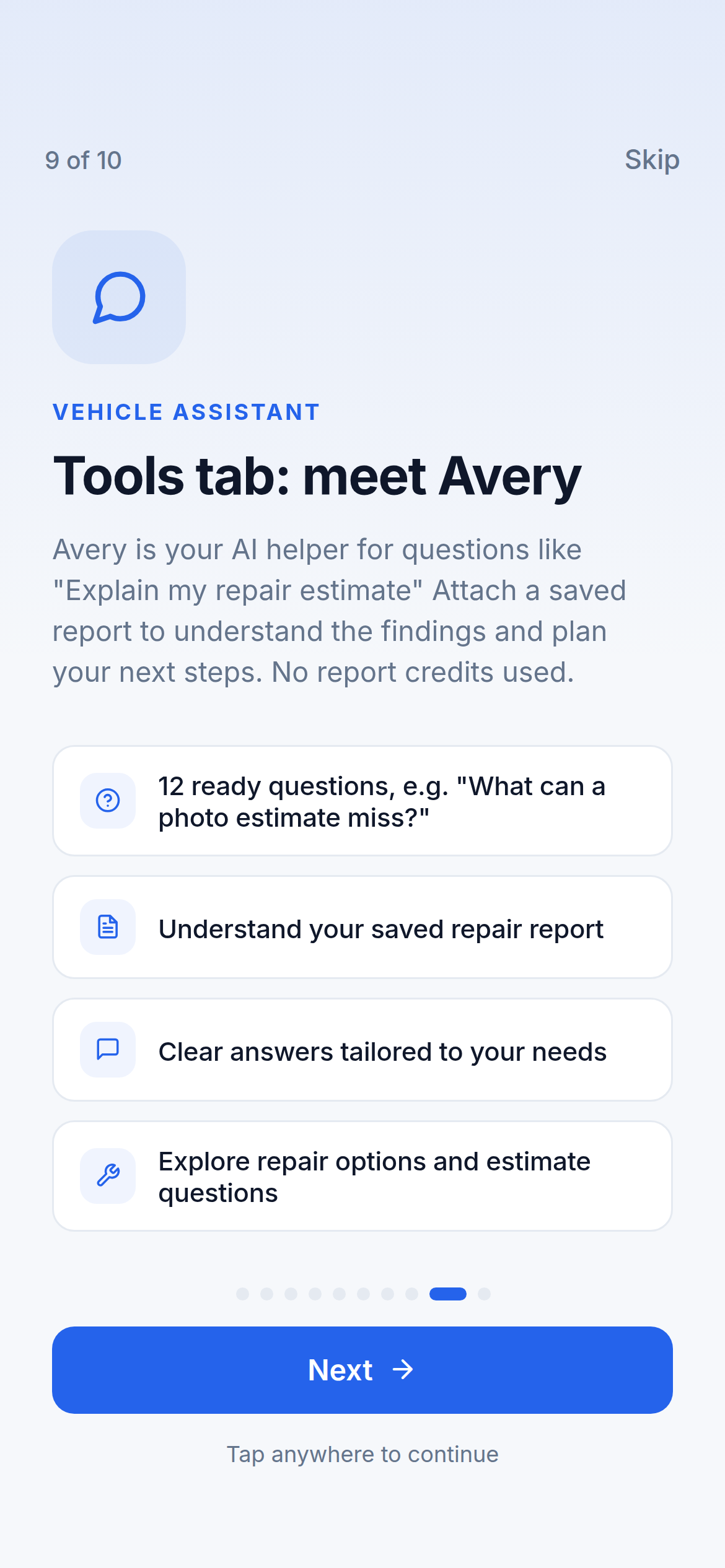
Car Repair Estimate & Parts, the AutoEstimatePro app for iPhone and Android, uses six named AI assistant profiles for those different starting points: Avery, Milo, Panel, Scout, Torque and Atlas. Each profile has its own introduction and 12 ready questions. You can attach one of your own saved reports for context. Assistant chat does not consume repair-report credits; generating reports and purchasing subscriptions remain separate workflows with their own terms.
This guide explains the profiles, the account setting behind them and how to ask a question that produces a useful next step. It is written by AutoEstimatePro LLC, the app's publisher, using the current app source and supplied tour previews checked on November 13, 2026. The scenarios are fictional examples of how to frame a question. They are not transcripts, customer outcomes or promises about an AI response.
One active profile, shaped by your account type
The six names are profiles of the app's assistant. Your account type determines which introduction and ready questions appear in Tools. They are not six independent professionals collaborating behind the scenes, and the website's six-card showcase is a preview rather than a live assistant switcher.
Auction Buyer maps to Scout; Rebuilder maps to Torque; Body Shop maps to Panel; Insurance maps to Atlas; and the accident or repair account type maps to Milo. Avery is the general vehicle profile when an account type has not been selected or onboarding was skipped. If your work changes, the Account screen has an Account type row that opens the selection flow again. Return to Tools after updating that setting and check the profile shown there.
Changing the profile changes the audience focus and suggested starting questions. It does not grant additional data access, change report ownership or create a new subscription entitlement. Use the choice that describes your work. There is no need to claim a professional role to ask an ordinary question about your own vehicle.
Avery: a clear place to start
Avery is the vehicle assistant for the broad question that has not yet become a specialist task. The general profile covers repairs, parts, titles, quote comparisons and vehicle research. Its introduction invites you to ask about a vehicle you own or are considering, with a saved report available to make the conversation more specific.
Start with the ready question “Explain my repair estimate.” Then narrow the request: “Separate the main repairs, the parts-versus-labor split and the items that need a closer inspection.” That gives the conversation a concrete shape. You can compare the resulting explanation with the report instead of judging a long answer by how confident it sounds.
Imagine a driver researching a vehicle before deciding whether to arrange a shop visit. They do not yet need a rebuild schedule or a claims summary. Avery's broad starting points help them name the next question: which document is missing, which part needs a fitment check, or which estimate line deserves an explanation. The useful result is a manageable next step, not a verdict about the entire car.
Milo: the repair owner's next conversation
Milo is the repair assistant for the owner trying to understand an estimate, choose a shop and prepare questions after an accident. Its ready questions include why shop quotes differ, what an estimate means, what could be hidden and what affects a repair timeline. The focus is the owner's practical conversation with the people inspecting and repairing the vehicle.
For example, ask “Why do shop quotes differ?” and add the specific difference you can see: “My preliminary report lists a repair operation, while the shop's written estimate lists replacement. Help me identify which scope and evidence questions to ask.” This keeps the discussion on the reason for the difference rather than inviting the assistant to pick a winner from two totals.
Milo also offers a safety-related starting question. That is an invitation to discuss warning signs and appropriate inspection, not a remote clearance to drive. An assistant cannot establish physical condition through a reassuring sentence. Keep vehicle-specific safety decisions with a qualified person who can assess the car, and do not turn a general answer into a driving authorization.
Panel: make the estimate easier to explain
Panel is the body shop assistant. Its focus includes customer explanations, intake photographs, labor-line questions, parts options and what may change after teardown. The profile is useful when the technical information is available but needs to be organized for a reader who does not work with repair estimates every day.
Try “How do I explain an estimate to a customer?” Then specify the boundaries: “Use plain language. Distinguish the work currently proposed from findings we have not confirmed. End with the questions that still need a decision.” The result should make the status of each item clearer, without converting a provisional item into an approved repair.
Consider a fictional intake conversation where the visible outer panel is documented but an adjacent mounting area has not been inspected. Panel can help frame a clear explanation of why the first estimate may change. The shop still supplies the actual findings, vehicle-maker procedures, labor basis and required approvals. The assistant's phrasing is a draft for review, not an official labor guide or a message automatically sent to the customer.
Scout: better questions before the bid
Scout is the auction assistant. Its starting questions cover pre-bid checks, auction fees, public VIN history, title terminology, transport, part fitment and room for uncertainty. The profile directs attention toward what is known before a purchase and what still needs evidence. The maximum-bid calculator is featured alongside the assistant for auction buyers.
Begin with “What should I check before bidding?” and attach your saved report if it is relevant. Add the listing facts you have verified, identify the source of any seller statement and name your missing information. A useful follow-up is “Which of these unknowns could materially change my decision, and what evidence would resolve each one?” That asks for a research structure rather than a prediction of profit.
Keep the conversation and the calculation connected but distinct. A text discussion can help identify an omitted transport allowance or an uncertain repair item. The calculator needs actual inputs for the budget scenario. An unknown fee is not zero, a displayed auction bid is not necessarily a completed sale, and no assistant response places a bid or guarantees a worthwhile purchase.
Torque: give a rebuild an order
Torque is the rebuild assistant for project planning. Its ready questions include the order of work, budgeting, parts choices, records to retain and work that needs a professional shop. The maximum-bid calculator is also featured for this account type, while the conversation emphasizes the dependencies that can make a project stall.
Start with “What order should I rebuild in?” Then make the request specific: “Use the saved report to separate inspection prerequisites, parts decisions, work requiring a qualified shop and costs that remain unpriced.” That is more useful than requesting a calendar filled with invented completion dates. An order of questions helps expose why one decision needs to wait for another.
In a fictional project, buying a replacement outer part may feel like progress even though a mounting condition is still unknown. Torque can help you identify that dependency and prepare a question for the repairer. It cannot supply a physical measurement, authenticate a replacement part or certify a finished rebuild. Keep confirmed findings, planning assumptions and unanswered questions visibly separate as the project develops.
Atlas: keep the facts and gaps distinct
Atlas is the claims assistant. Its profile focuses on reviewing estimate details, identifying missing documentation and preparing neutral summaries of a saved report. Ready questions include what to check in an estimate, which photographs are missing and how to summarize the report for a file. The product introduction explicitly leaves claim decisions with the responsible person.
A useful starting request is “What should I check in this estimate?” Follow with “Organize the answer into reported findings, estimated costs and items that still need verification.” You can then compare each point with the source document. This format helps prevent an inferred concern from quietly becoming an established finding in a summary.
For example, a fictional report may mention a possible adjacent component issue that cannot be confirmed from the images. A neutral summary should retain that uncertainty and identify the inspection question. Atlas does not determine coverage, negotiate a settlement, predict a total-loss outcome or replace the insurer's review. Its value here is clearer organization of the available information, with the gaps still visible.
Attach the right report before asking for specifics
Open Tools in your signed-in app account and use the saved-report attachment option when your question depends on a report. Select a report that belongs to your account, check the vehicle and review its date. An assistant profile does not provide access to another customer's reports or to a document that has not been supplied.
Give the question a purpose as well as a document. “Summarize this” leaves the assistant to guess what matters. “Summarize the cost lines I should discuss with the repairer, keeping unconfirmed findings separate” tells it who will use the answer and what decision comes next. Avoid including unrelated personal details when the vehicle evidence is sufficient.
Read the answer against the attachment. If the conversation uses a fact you cannot find in the report, ask where it came from and verify it before relying on it. Repeating a claim in a second AI answer does not independently confirm it. A good explanation makes the original evidence easier to inspect; it should not hide that evidence behind more fluent prose.
Turn a ready question into your own useful prompt
The 12 ready questions are starting points. Add three pieces of context: the decision, the evidence and the requested output. For example: “I am preparing for a shop visit. I have attached today's preliminary report and have not had an in-person inspection. Give me three questions, each linked to a report item or a clearly identified missing fact.”
Then ask for a manageable format. A short list with an evidence note and next owner is often easier to act on than a long explanation. “Part fitment: ask the supplier to confirm the exact number and configuration” identifies a task. “The part will fit” would be a conclusion needing separate support. Keep that distinction when you copy a useful question into your own notes.
Avoid asking the assistant to validate a preferred outcome. “Prove the cheaper quote is right” starts with a conclusion. “Identify the differences in scope and the evidence needed to explain them” starts with a reviewable task. You can still bring your priorities—cost, time or uncertainty—without asking the assistant to ignore information that does not fit them.
Know what carries over and what does not
The current chat implementation uses session-only conversation memory rather than a saved database chat history. Do not assume a later session will remember an earlier discussion. Keep any useful, privacy-appropriate summary in your own records, and reattach the relevant report when starting again. A saved report and a saved conversation are different things.
All six profiles work within the same access and billing boundaries. The featured position of the calculator for Scout and Torque does not mean other profiles receive a different repair report, and changing an account type does not convert an answer into professional verification. Check the current app screen and purchase terms for the access available to your account.
The tour screens on this website were supplied by the publisher and rendered from the app tour in a browser preview. They show the profile names, introductions and example questions; they are not native-device captures or proof of a completed customer interaction. The website cards let you explore those roles before downloading the app.
A small workflow you can use today
Choose the account type that matches your task, open Tools and check the named profile. Attach the relevant saved report, select a ready question and add the decision you are trying to make. Ask for a short answer that separates findings, assumptions and unknowns. Verify the important details against the report and the appropriate outside evidence.
Finish with one next action you can explain to another person: a question for a repairer, a fitment check for a supplier, a missing document to request or an input to confirm before calculating a budget. Avery, Milo, Panel, Scout, Torque and Atlas offer different starting points for that process. The outcome to look for is a clearer conversation and a better-supported next step.
Explore all six assistant profiles
Follow the complete Android and iPhone report workflow